Transactions
3,947
Up 37.7% vs. previous period
Total successful transactions

THE BUSINESS OPERATIONS CENTER
From daily activity to the details behind a transaction, explore the workspace that helps agents and dealers understand their prepaid business.
Available tools depend on your role, permissions and account configuration. Contact Pay’nUp to confirm the right setup for your business.
A CLOSER LOOK
Overview, Activity and Failures views organize the information your team uses to review performance and investigate exceptions.
Review transactions, sales and commissions alongside success rates and period comparisons.
Welcome to payment center
3,947
Up 37.7% vs. previous period
Total successful transactions
$522,596.12
Up 61.7% vs. previous period
Transaction volume (processed)
$23,365.79
Up 94.7% vs. previous period
Total commission earned
$132.40
Up 17.5% vs. previous period
Sales ÷ Transactions
$4.47
Up 20.3% vs. previous period
Gross Commission per $100 in sales
$5.92
Up 41.4% vs. previous period
Gross Commission ÷ Transactions
97.1%
Up 3.3% vs. previous period
117 failed of 4,064
Demo Dealer 15 is selling less: 29 transactions, down from 78 (62.8% less).
5 dealers sold in the previous period but haven’t sold anything in this one.
4 live dealers are selling significantly less than usual.
| Dealer | TXN | Trend | Sales / Comm. | Rate | |
|---|---|---|---|---|---|
1Demo Dealer 02 |
596 | Up 208.8% | $79,781.72$3,640.32 | 15.3% | |
2Demo Dealer 01 |
310 | Up 37.8% | $39,726.81$1,792.81 | 7.6% | |
3Demo Dealer 08 |
279 | Up 149.1% | $38,238.72$1,706.45 | 7.3% | |
4Demo Dealer 03 |
243 | Up 32.8% | $33,759.26$1,531.68 | 6.5% |
Compare activity across weekdays and time blocks to understand patterns in the selected period.
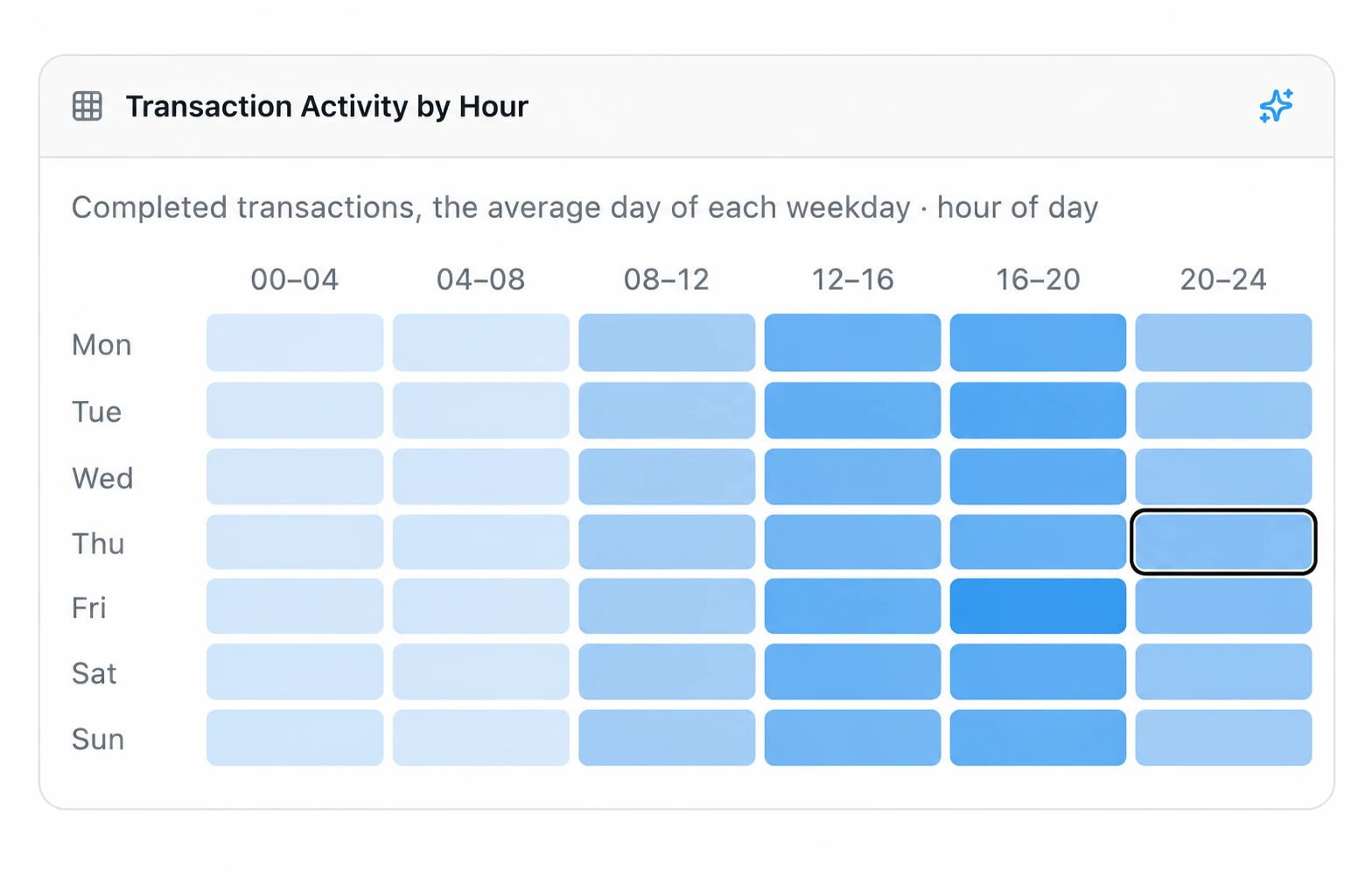
Review failure patterns by time. Use the platform’s related records and responses to investigate individual issues.
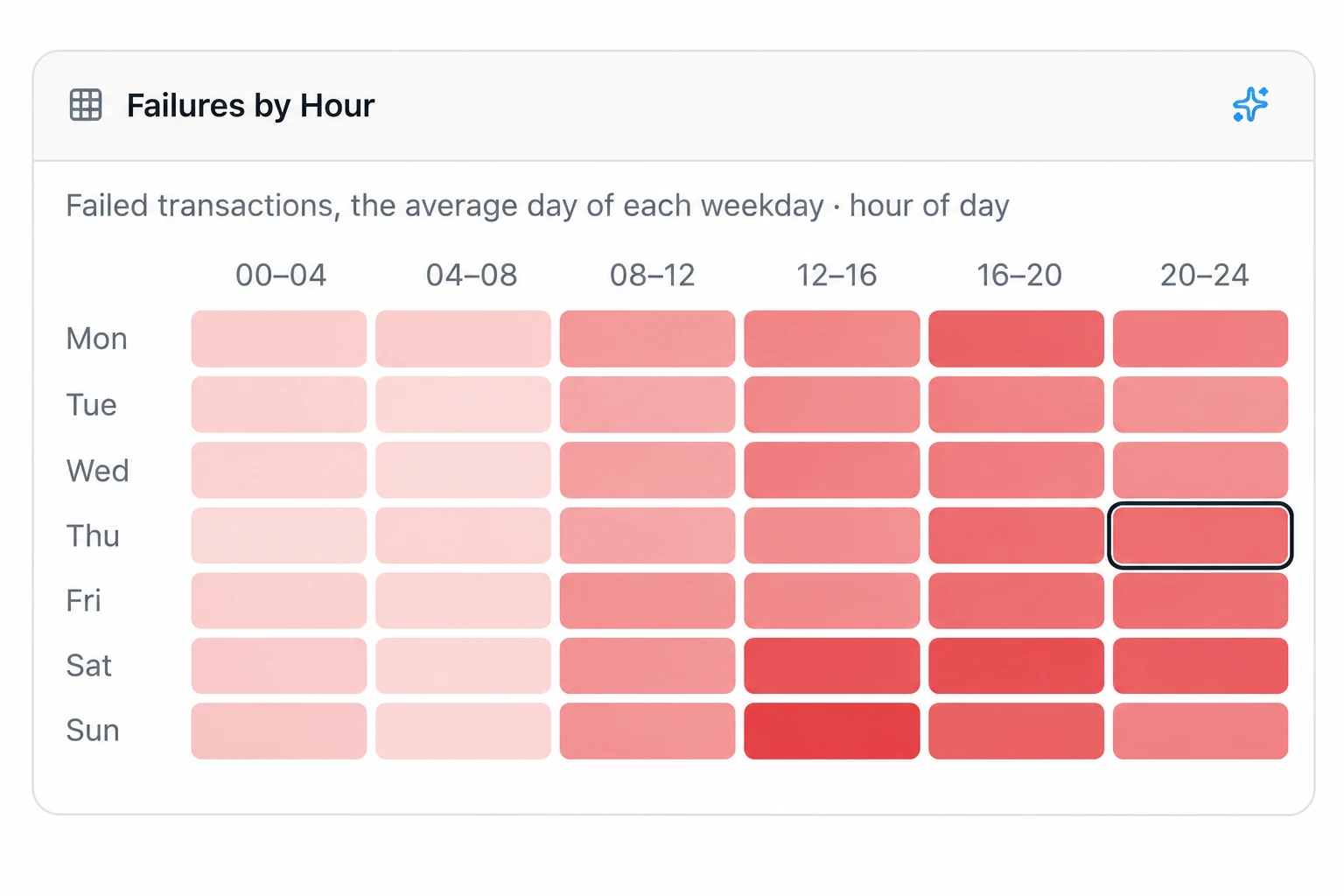
The Overview is an interactive demo: all its figures and names are simulated. The other previews are AI-edited crops of supplied Pay’nUp screenshots, with identifying details and account-specific figures removed. They illustrate interface features, not business results. Select an image to view it larger.
BILLING CENTRAL
Bring invoices, bills and collection activity into a clear overview. Review upcoming billing, overdue items and reconciliation work from one place.
What you have to collect and to pay, and what is coming up
$186,420.55
142 open invoices
$48,915.20
37 open bills
$21,384.90
Past the due date
$64,208.75
1,846 transactions
Next invoice Nov 16 at 11:59 PM
$273,357.22
Up 14.2% vs. last month
379 invoices
$237,820.78
Up 9.7% vs. last month
$195,013.04 from November invoices
$42,807.74 from earlier ones
$38,612.40
4 ACH batches
$1,245.00
2 ACH batches
18 invoices overdue. $21,384.90 past due to collect.
2 ACH batches with returned payments to collect. $1,245.00 came back and has not been collected again — do it from the returned entry in the batch detail.
3 bills overdue. $4,210.00 past due to pay.
4 ACH batches not reconciled yet. Reconcile them against the bank statement, marking any returned entry.
6 subscriptions bill this week. Recurring invoices about to be issued.
A/R Aging Summary Report
| Customer | Current | 1–30 | 31–60 | 61–90 | 91 and over | Total | |
|---|---|---|---|---|---|---|---|
| Total | $165,035.65 | $14,212.40 | $4,820.75 | $1,618.30 | $733.45 | $186,420.55 | |
| Demo Dealer 02 | $28,410.20 | $3,120.00 | $1,940.50 | $33,470.70 | |||
| Demo Dealer 07 | $22,905.35 | $2,480.15 | $980.00 | $26,365.50 | |||
| Demo Dealer 01 | $19,730.80 | $1,865.00 | $1,120.25 | $22,716.05 | |||
| Demo Dealer 11 | $15,212.60 | $733.45 | $15,946.05 | ||||
| Other customers | $78,776.70 | $6,747.25 | $1,760.00 | $638.30 | $87,922.25 |
A/P Aging Summary Report
| Vendor | Current | 1–30 | 31–60 | 61–90 | 91 and over | Total | |
|---|---|---|---|---|---|---|---|
| Total | $44,705.20 | $3,410.00 | $800.00 | $48,915.20 |
| Invoice / Customer | Due | Status | Amount |
|---|---|---|---|
| 00544818Demo Dealer 02 | Nov 26, 2026 | Unpaid | $4,826.40 |
| 00544817Demo Dealer 07 | Nov 25, 2026 | Paid | $3,912.75 |
| 00544816Demo Dealer 11 | Nov 24, 2026 | Partially paid | $2,740.20 |
| 00544815Demo Dealer 01 | On receipt | Paid | $3,385.60 |
| 00544814Demo Dealer 04 | Nov 22, 2026 | Unpaid | $1,964.35 |
| 00544813Demo Dealer 08 | Nov 21, 2026 | Paid | $2,218.90 |
| Customer | Transactions | Amount | Next invoice |
|---|---|---|---|
| Demo Dealer 02 #10482 | 412 | $14,826.30 | Nov 16 at 11:59 PM |
| Demo Dealer 07 #10517 | 368 | $12,904.15 | Nov 16 at 11:59 PM |
| Demo Dealer 01 #10471 | 341 | $11,730.40 | Nov 16 at 11:59 PM |
| Demo Dealer 11 #10544 | 297 | $10,215.90 | Nov 16 at 11:59 PM |
| Demo Dealer 04 #10493 | 248 | $8,146.60 | Nov 16 at 11:59 PM |
| 1 more customer | 180 | $6,385.40 | |
| Total | 1,846 | $64,208.75 |
| Batch | Status | Balance | Created |
|---|---|---|---|
| #1291 · Weekly collection | Draft | $12,480.60 | today |
| #1290 · Weekly collection | Pending | $11,935.20 | 1 day ago |
| #1289 · Weekly collection | Submitted | $10,842.75 | 2 days ago |
| #1288 · Subscriptions | Submitted | $9,615.40 | 3 days ago |
| #1287 · Weekly collection | Submitted | $9,340.85 | 5 days ago |
| #1286 · Weekly collection | Submitted | $8,813.40 | 6 days ago |
Review what is owed to you and what you owe. Open the related billing record to inspect line items, linked transactions, due dates and payment records.
Use overdue indicators and aging summaries to identify balances that need attention. Review upcoming subscription billing alongside current obligations.
Review ACH batches, returned entries and provider or gateway reconciliation views where enabled. Keep invoice, transaction and settlement statuses distinct.
Inside the platform, select Billing Central → Overview. Billing arrangements and available controls depend on your account setup. A billing total or processed record alone does not confirm settlement.
BUILT INTO PAY’NUP
Ask questions about your business in everyday language, right inside the Business Operations Center.
The built-in assistant draws on your own data—sales, products and merchants you can already see—to help you explore business activity.
Sign in and select Pay’nUp AI Assistant. Availability and data access depend on your account and permissions. Check responses against the relevant records.
START WITH A QUESTION
Example questions from the Pay’nUp interface. Use the assistant inside your existing platform account.
AGENT WORKSPACE
For organizations overseeing dealer accounts, pricing relationships, channel configuration, billing and support.
DEALER WORKSPACE
For merchant managers and authorized store staff reviewing their own activity and account information.
EXPLORE THE WORKSPACE
Explore the areas of the Business Operations Center. Your account administrator can confirm the tools enabled for your role.
Dashboard views summarize successful transactions, processed sales, success rates and commissions for the selected period. Drill into transaction records and inspect the service status, customer payment status and provider response separately.
Dealer activity, dealer leaderboards, location and source views, and reports covering sales, failures, card-related records, fees and store gift-card activity.
Store-scoped activity, source comparisons, transaction details and the reports exposed to the account. Available reports may include E911-related transaction and fee records.
Dashboard transaction counts cover successful transactions; the Transactions list can cover all matching statuses. Compare the same dates and filters. Use the available search, grouping and export controls to focus your review.
Search Products and Categories by product, carrier or SKU. Review prices, fees, discounts and commissions as separate values.
Retailer price lists, wholesale prices and discounts, inherited pricing, and representative pricing relationships. Pricing controls include Edit Mode, approval, spreadsheet import and batch-discount settings.
Available store products, retailer price lists and customer discounts or fees. Product and carrier Direct Payment QR-code dialogs link toward a separate customer flow.
Agent tools include promotional gifts, discount codes, PIN inventory, load packs and private-label gift-card brands, cards and ledger views. Ask Pay’nUp about the inventory and promotion tools available to your account.
The Agent view brings dealer records, store locations, clerk accounts and customer records into distinct areas. Dealer lists show account status and activity; location records identify store origins.
Dealer settings cover identity, assigned pricing, category restrictions, fees, billing, providers, notifications and security. Availability depends on the account.
Authorized users can consult customer records and related activity to investigate an issue. Keep support investigations connected to the relevant dealer and transaction.
Dealer, location and customer setup forms collect the information for each account. Coordinate onboarding with your authorized administrator.
The Agent interface includes clerk/POS settings, terminal records, kiosk management and API-key controls. Confirm enabled channels and setup requirements with Pay’nUp.
Clerk settings distinguish sales access from backend staff access, with location, product, payment-method and access restrictions. Terminal settings provide a separate configuration area.
Views cover the kiosk fleet, jobs and map, along with themes, advertising and maintenance content. Contact Pay’nUp about device setup and deployment requirements.
API-key settings document dealer, location, scope, environment and IP restrictions. Provider, gateway and plugin settings are also present. Contact Pay’nUp about current integration eligibility, documentation and setup.
Billing Central separates invoices, payments and billing stages. Pending describes approved transactions awaiting a billing cut-off; Processed describes those already invoiced.
Review invoices, line items, linked transactions and payment records. Contact your Agent about billing arrangements and payment instructions.
Additional views and forms cover subscriptions, dealer-account funds, ACH records, gateway and provider reconciliation, wallet ledger entries and settlement batches.
A processed billing record does not establish settlement. Transaction status, customer payment status and invoice status answer different questions. Review each status separately when investigating a billing question.
Agent commission views distinguish incoming earnings from outgoing representative commissions, with transaction references and separate gross and net amounts.
Representative settings cover hierarchy, groups, dealer eligibility and pricing ownership. A representative may manage price lists or use a configured commission relationship.
Statement controls use a closing day for pending commissions. Membership records and a dealer membership selector provide additional account configuration.
Eligibility, commercial terms, commission calculations and payout arrangements are account-specific. Review payout status separately from reported earnings.
Managers, backend staff, POS clerks and representatives serve different purposes. Staff groups, default permissions and location scope organize backend access.
Profile covers an individual’s identity and sign-in settings. Merchant Settings covers the organization or store, including available branding, notification and security options.
Two-factor settings and account restrictions are available in the documented interface. Work with your account administrator on configuration and recovery.
Some account settings include public-site colors, headlines and channel controls. Ask Pay’nUp which presentation and channel options apply to your account.
The interface includes Inbox, Sent and Drafts, notification-recipient settings, contextual About explanations and a Pay’nUp AI Assistant entry point.
Message drafts and email-recipient settings are separate tools. Use the relevant area to review message status or configured recipients.
The interface describes assistance based on sales, products and merchants the user can already see. Check responses against the underlying transaction or report.
Service Provider Logs and Administration Activity offer investigation views for authorized users. Use these records alongside the relevant transaction references when investigating an issue.
A CLEARER DAILY ROUTINE
Confirm your account, dates and filters before reading a dashboard or report. Empty results may reflect the selected period.
Use the transaction number and date to find activity. Review the product, source, response and customer payment status separately.
Compare the related invoice and payment record. Give your Agent or support team the relevant reference and exact issue through an approved channel.
PLATFORM QUESTIONS
No. This public website explains Pay’nUp. Sign-in and operational work happen at admin.paynup.com. Purchases use your enabled sales channel or app.
Backend staff and POS clerks are separate account types. Your Agent or account administrator can confirm the access needed for each person.
Not necessarily. Service transaction status and customer payment status are separate. Ask your authorized support contact to review both before retrying.
Menus depend on role, permissions, account configuration and enabled channels. Your Agent or account administrator can confirm your available tools.
Setup is coordinated through the Agent, with assigned or inherited price lists and possible representative pricing relationships. Ask your Agent to confirm your store’s arrangement and any requested changes.
Contact Pay’nUp to confirm eligibility, commercial terms, setup requirements and current availability for your business.
Open your existing workspace. For missing menus or store-specific pricing and billing questions, contact your Agent or account administrator.
Access Pay’nUp